Free micropatches available for "LegacyHive" (was 0day, now CVE-2026-62832)
[Update 8/11/2026: Microsoft patched "LegacyHive" with August 2026 updates and assigned it CVE-2026-62832. Our users had this vulnerability patched 23 days before the official vendor patch became available. Microsoft's patch is logically equivalent to ours.]
Six days ago, security researcher Nightmare-Eclipse published a proof-of-concept for local privilege escalation vulnerability in Windows. This vulnerability has no official patch from Microsoft yet; meaning that even fully-patched Windows computers are vulnerable.
The vulnerability allows a regular non-admin user to mount any other user's registry hive in full access mode, and then either extract that user's stored secrets or modify any values in their registry to affect what gets executed the next time they log in.
We analyzed the vulnerability and created a free micropatch for it, which we have issued today for anyone to use.
The Vulnerability
The vulnerability lies in Windows User Profile Service. When a logged-in user runs a new process as another user, User Profile Service loads said user's registry hive (comprising said user's HKEY_LOCAL_USER and HKEY_CLASSES_ROOT) and makes them available to the original user.
In this process, there is a time-of-check-to-time-of-use (TOCTOU) vulnerability that allows the local attacker to use a symbolic link to confuse User Profile Service into loading any user's registry hive file instead of the requesting user's file. Such user's registry hive ends up loaded in attacker's registry space, with read/write permissions.
When this is done, the attacker can either read target user's stored secrets (keys, tokens, etc.) or replace paths to trusted executables and DLLs with paths to attacker's malicious alternatives - which will get executed the next time target user logs in.
The way User Profile Service works in the vulnerable part of the code is that it makes an access check on the registry hive file that it's been requested to mount to see if the requesting user is allowed to mount it with full access. If so, the hive is mounted with requesting user's identiy using a newer function NtLoadKey3, which supports impersionation.
If, however, the registry hive file cannot be opened with full access, an older function NtLoadKeyEx is used without user impersonation, therefore the hive is loaded with full access as Local System.
This is actually pretty weird. It looks like a typical security check ("Does the user have access to the file? If so, go left, otherwise go right"), but it actually means "Does the user have access to the file? If so, use their identity to load the file, otherwise use Local System identity to load the same file." Consequently, this always ends up succeeding in loading the file in all typical conditions. In other words, the file could have been simply loaded as Local System in all cases to the same effect 🙂.
The following is our speculation about how this code could have come to be, so don't take it as a fact; we just needed to find some plausible explanation for the weirdness as it's always easier to patch a bug if you can imagine why it's there.
[James Earl Jones voice] Some rainy day a decade or so ago... A Microsoft programmer is tasked with fixing a vulnerability similar to LegacyHive, where a low-privileged user can get User Profile Service to load another user's registry hive with a similar symbolic link trick. The programmer looks at the code - back then being simply a call to NtLoadKeyEx- and decides to add a reasonable check: if the request came from the service itself (no user token to impersonate), the request is trusted so let's use NtLoadKeyEx; otherwise, let's impersonate the user and load the hive with their identity using NtLoadKey3. This check blocked the exploit... but it broke some legitimate use case where the hive file is read-only, for example Mandatory User Profiles used in school computer labs, public-access computers and shared call center computers.
In these cases, User Profile Service copies a pre-configured user profile registry hive file NTUSER.MAN from a network share and stores it as a local copy that is read-only for the user. The patch imagined by the programmer would break this scenario, as impersonated NtLoadKey3 call requested full access to the file, but the file was read-only for the user. So the programmer solved the problem with an additional access check: if the hive file cannot be opened with full access, keep using the privileged NtLoadKeyEx call.
What was not immediately obvious was that adding this second branch entirely removed the security added by the first one.
Back to the present day.... Let's see the vulnerable code on all still-supported Windows versions in graphical representation:
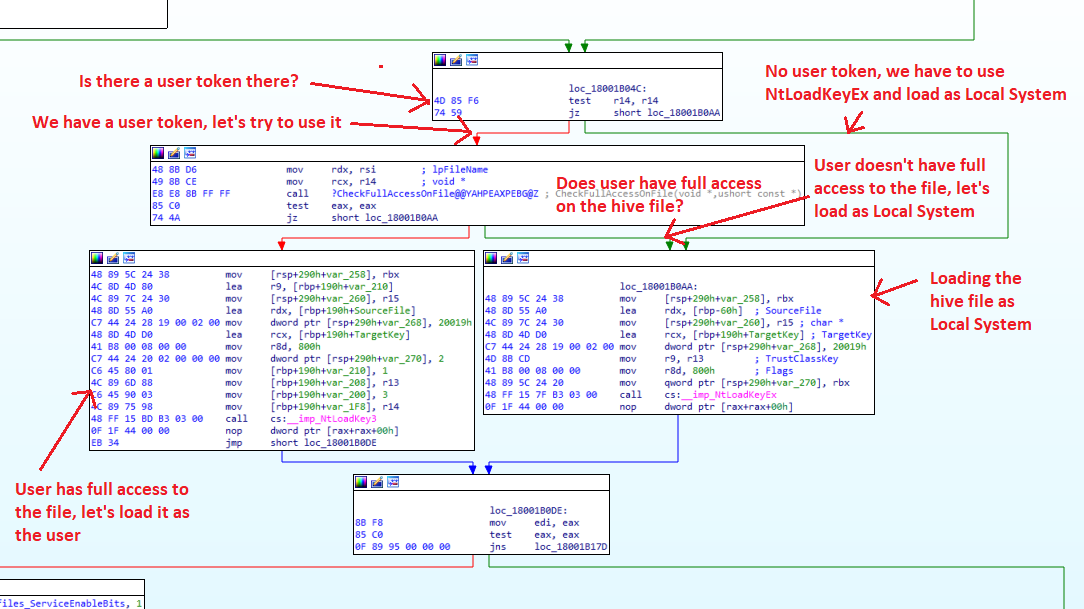
Register r14 contains a user token if the code executes as a result of user request - or 0, if the code was called internally by the process itself. When the token is 0, there is nobody to impersonate, so the execution continues to the block that calls NtLoadKeyEx as Local System. Otherwise, theCheckFullAccessOnFile function is called, doing exactly what it's named: checking if the user behind the token has full access to the DAT file that is about to be mounted.
If the user does have full access, execution continues with the block that calls NtLoadKey3 with user impersonation. But if the user does not have full access, we jump to the Local System block to avoid breaking the read-only scenario.
Now let's see what LegacyHive exploit does. It is launched by a user, so that user's token is there in register r14. The DAT file processed by the CheckFullAccessOnFile call, however, is planted temporarily by the exploit and has permissions such that the call fails. Consequently, the execution is diverted to the NtLoadKeyEx call executed as Local System - but between the two calls, the exploit replaces the path to the planted DAT file with a path to another user's USRCLASS.DAT file using a classical symbolic link trick.
This results in said USRCLASS.DAT registry hive being mounted in attacker's registry space, with full read/write permissions.
Microsoft's Patch
At the time of this writing, there is no official Microsoft patch for this vulnerability. [See update at the top of article.]
Our Patch
Our patch effectively softens the second check added by the hypothetical programmer above, such that the final logic of the code is now:
If there is a user token,
NtLoadKey3with impersonation has to be used. Only a no-token case proceeds to Local Sytem-executedNtLoadKeyEx. (This is actually the original idea of our hypothetical programmer.)When a user token is there: If the
CheckFullAccessOnFilecall succeeds, the hive file is loaded usingNtLoadKey3with user impersonation, as full-access hive. (No change there.)If it fails, however, the hive file is still loaded using
NtLoadKey3with user impersonation, but as read-only hive.
This logic breaks the LegacyHive exploit without also breaking any legitimate scenarios known to us, including the Mandatory User Profile scenario.
Let's see our patch in action. The attacker is logged in to fully updated Windows 11 25H2 as a non-administrative user acros. There are two other accounts of interest on the computer: normaluser is another non-admin user whose password is known to the attacker, and adminuser is an administrative user whose registry hive the attacker is targeting.
The attacker has Registry Editor open to observe the changes to the registry space.
With 0patch disabled, the attacker runs the LegacyHive exploit, instructing it to login as user normaluser but mount the registry hive from user adminuser. The attack succeeds and we see two additional hives mounted in attacker's registry space; we prove that they belong to adminuser by locating references to this user name.
With 0patch enabled, the exploit still seems to work, but it loads a temporary user profile hive instead of that from adminuser. Loading a temporary user profile hive is of no use to the attacker.
Micropatch Availability
Micropatches were written for the following still-supported Windows versions:
Windows 11 25H2 - fully updated to July 2026
Windows 11 24H2 - fully updated to July 2026
Windows 11 23H2 - fully updated to July 2026
Windows Server 2025 - fully updated to July 2026
Windows Server 2022 - fully updated to July 2026
and for the following security-adopted Windows versions:
Windows 11 22H2 - fully updated
Windows 11 21H2 - fully updated
Windows 10 22H2 - fully updated
Windows 10 21H2 - fully updated
Windows 10 21H1 - fully updated
Windows 10 20H2 - fully updated
Windows 10 2004 - fully updated
We found this issue does not affect Windows versions older than Windows 10 2004, including any Windows 7 versions. The issue also does not affect Windows Servers 2008 R2, 2012, 2012 R2, 2016 and 2019.
Since this is a 0day vulnerability, we included it in our FREE plan until an official vendor patch is available from Microsoft.
Micropatches have already been distributed to, and applied on, all affected online computers with 0patch Agent in FREE, PRO or Enterprise accounts (unless Enterprise group settings prevented that).
Vulnerabilities like these get discovered on a regular basis, and attackers know about them all. If you're using Windows that aren't receiving official security updates anymore, 0patch will make sure these vulnerabilities won't be exploited on your computers - and you won't even have to know or care about these things.
If you're new to 0patch, create a free account in 0patch Central, start a free trial, then install and register 0patch Agent. Everything else will happen automatically. No computer reboot will be needed.
Did you know 0patch security-adopted Windows 10 and Office 2016 and 2019 when they went out of support in October 2025, allowing you to keep using them for at least 3 more years (5 years for Windows 10)? Read more about it here and here.
To learn more about 0patch, please visit our Help Center.